One connected workspace

A workspace that moves with you.

See the whole sales picture. Go deeper into the details. Keep the next action close.

One connected workspace

Less busywork. More business.

From the first promising prospect to the next meaningful conversation. Keep the context, lose the admin.

01

A pipeline with perspective

Contacts, companies, deal health and next actions. A shared picture of what matters, not another list to maintain.

01Find the right people
02Approve the approach
03Make room for meetings

Product illustration · not live activity

Explore the details

Review deal context, spot opportunities that need attention, and keep follow-ups connected to your customer history.

02

Meet your booking assistant

A considered path from prospect research to approved outreach and a place in your calendar.

Explore the details

Review suggested prospects, approve your offering and dialogue, and choose campaign caps or weekly targets. You can pause at any time.

Check current automation availability in Elori. Execution requires verified email, delegated connections, selected calendars, mandatory campaign approvals and caps, with no active pause. The first 2 meetings are free; paid meetings also require a card, eligible subscription and explicit fee consent. Connection alone does not activate sending or booking.

03

Your context. Your conversation.

Connect Elori context to a compatible Claude or ChatGPT client through MCP.

Explore the details

MCP is a connection protocol, not extra authority. Existing permissions and mandatory approvals still apply. Review the requesting client and callback origin; a client-supplied name is not publisher verification.

Use Elori browser OAuth and explicit consent. Client-supplied names do not verify Claude/OpenAI publishers or imply directory listings. Existing permissions and mandatory approvals remain enforced; card consent and provider authorization stay in the browser.

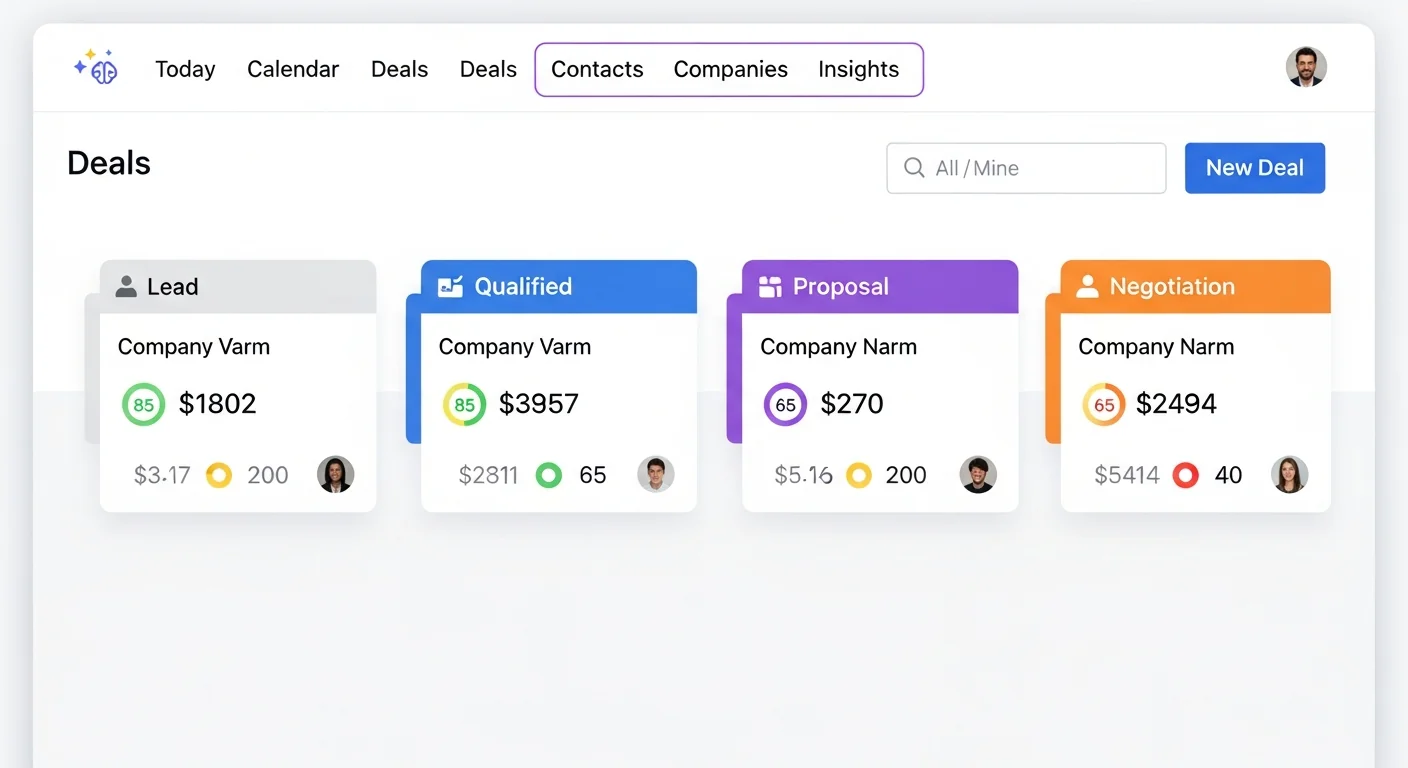
Smart Deal Pipeline

Visual kanban board with AI-powered health scoring. See at a glance which deals need attention and which are on track to close.

Smart Deal Pipeline
Product illustration · not live activity
AI Chat Assistant
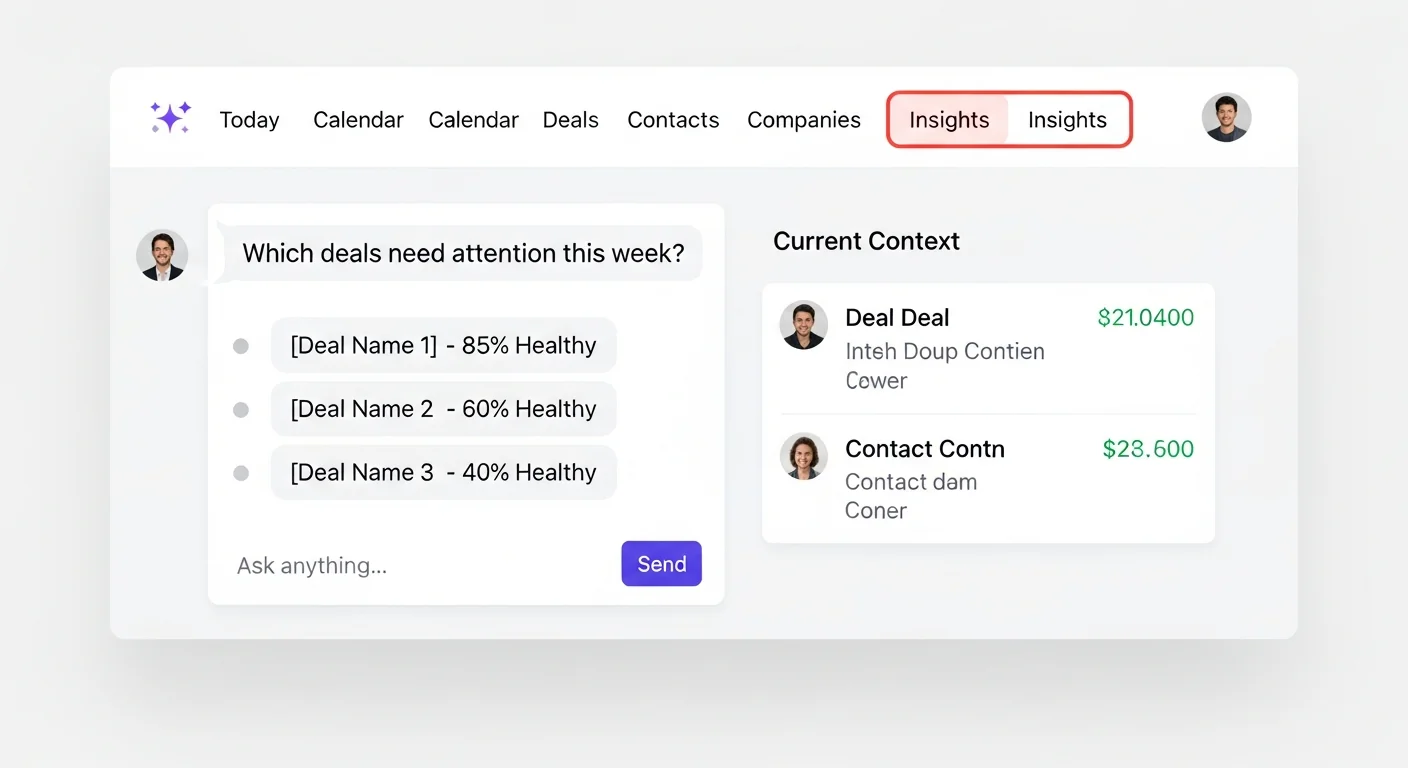
Product illustration · not live activity
From prospect to conversation

Meet your booking assistant

Set the direction. Approve the people and the message. The booking workflow follows through within your approved limits when execution is enabled.

Check current automation availability in Elori. Execution requires verified email, delegated connections, selected calendars, mandatory campaign approvals and caps, with no active pause. The first 2 meetings are free; paid meetings also require a card, eligible subscription and explicit fee consent. Connection alone does not activate sending or booking.
01

Research, then review

Public-web research suggests companies and contacts. Email-pattern verification is a signal, not a guarantee of mailbox ownership. You approve the prospects.

02

Connect on your terms

Google or Microsoft delegated email and calendar permissions support the workflow. Connection grants permission; it does not activate automation.

03

Approve the conversation

Approve the offering and dialogue before follow-ups and scheduling. Set campaign caps or weekly targets, and pause whenever you need.

04

Make the next conversation better

Reviews from 0–10 and linked deal outcomes inform adaptive context. This is not model retraining.

The details make the difference.

See the whole sales picture. Go deeper into the details. Keep the next action close.

AI Sales Director

Elori reviews your entire pipeline like a VP of Sales, comparing every deal against the rest, and recommends the right next stage for each one.

Autonomy Spectrum

Autonomy is subject to eligibility, permissions and approvals. Booking execution also requires current service availability, caps, billing consent when paid and no active pause.

AI Today View

Start each day with AI-prioritized actions. See exactly what needs your attention, ranked by urgency and opportunity.

Smart Pipeline

Every deal gets a health score from 0-100%. AI detects at-risk deals before they slip away.

Email Intelligence

AI drafts personalized follow-ups and analyzes sentiment. Know when prospects are engaged or going cold.

Meeting Intelligence

Automatic transcription with AI-extracted action items, decisions, and next steps.

Sales Forecasting

AI-powered predictions based on your pipeline health, historical data, and deal momentum.

AI Chat Assistant

Ask questions about your pipeline, deals, or contacts. Get context-aware insights on demand.

Lead Prospecting

Elori builds tailored prospecting strategies and search terms from your ideal customer profile.

Company Intelligence

Elori researches company websites and public sources to summarize each account, score ICP fit, and flag risks before you engage.

Automatic Data Entry

Contacts and companies are created automatically from your emails and calendar invites.

Activity Timeline

Complete interaction history across emails, meetings, and notes. See the full story at a glance.

Duplicate Detection

AI detects similar contacts and companies before you create duplicates. Merge or review with one click.

Sales Targets

Set personal targets and track progress with AI-powered forecasting and pace tracking.

Products Catalog

Add products and services to deals with quantities. Deal values calculate automatically.

ICP Matching

Define your ideal customer profile. Deals are scored on company fit to help you focus on best-fit prospects.

Custom AI Reports

Chat with Elori to design and generate Excel, PDF, or PowerPoint reports from your live sales data.

Next Action Dates

Every deal requires a next action date. No more forgotten opportunities or stale deals.

AI That Learns

Reviews from 0–10 and linked deal outcomes inform adaptive context. This is not model retraining.

Email Data Extraction

BCC Elori on emails and it extracts contacts, companies, and deal details automatically.

Multi-Currency Support

Track deals in any currency with automatic conversion using daily ECB exchange rates. Reports show values in your preferred currency.

Claude and ChatGPT MCP connections are included only with Director and Autopilot. Not included with Assistant.

A new way into your workspace

Elori context. Claude or ChatGPT.

The Elori MCP connection gives a compatible assistant a permissioned route to your sales context. One workspace, without starting the conversation from scratch.

Use Elori browser OAuth and explicit consent. Client-supplied names do not verify Claude/OpenAI publishers or imply directory listings. Existing permissions and mandatory approvals remain enforced; card consent and provider authorization stay in the browser.
eloriPermissioned access
ClaudeChatGPT
01

Find the connection URL

Open MCP connections in Elori Settings and copy the configured server URL. Use a compatible Claude custom connector or ChatGPT developer-mode MCP where available; client and plan support vary.

02

Authorize in your browser

Use the secure browser OAuth flow, check the account and permissions, and approve only the access you intend to grant. Never paste your password into a chat.

03

Keep control of access

Existing permissions and mandatory approvals are honored. Review or revoke the connection from Settings.

Your next chapter starts with a clearer pipeline.

Explore Elori today. Keep the decisions that matter, and give the admin somewhere else to go.

7 days to explore. Your first 2 booked meetings are free. No card needed for the trial.